

A Comprehensive Guide to the 2.4G Wireless Security Solution for Modern Parents
Introduction: The Ultimate Review

The Quest for Peace of Mind
Parenting is a journey filled with joy, love, and—inevitably—anxiety. One of the most significant milestones for new parents is moving the baby into their own room. The transition brings up a universal question: “How do I know they are okay when I am not in the room?”
In the crowded market of baby gear, the BOAVISION VB801 4.3 Inch Video Baby Monitor has emerged as a standout contender. With over 2,000 units sold and a stellar 4.8-star rating, this device promises to bridge the gap between parent and child without the complexities of modern internet-connected devices.
This article is not just a review; it is a complete encyclopedic guide to the VB801. Whether you are a tech-savvy parent looking for specs or a nervous first-time mom needing assurance, we have analyzed every inch of this device—from its 1760mAh battery to its 300-degree pan rotation—to help you make an informed decision.
Product Overview & Specifications: The Ultimate Review
Before we dissect the features, let’s look at the raw data. The BOAVISION VB801 is a dedicated video and audio monitoring system that operates on a closed-loop frequency, ensuring privacy and ease of use.
Technical Specifications Sheet: The Ultimate Review
- Model Number: VB801
- Brand: BOAVISION (Top Brand on AliExpress)
- System Type: Video & Audio Surveillance
- Transmission: 2.4GHz Wireless (GFSK Modulation)
- Origin: Mainland China
- Certification: CE Certified
The Monitor (Parent Unit)
- Display Size: 4.3 Inch LCD Color Screen
- Resolution: 480 x 272 Pixels
- Battery: Built-in Li-polymer 1760mAh
- Dimensions: 82.5mm (W) x 151.6mm (H) x 19.5mm (D)
- Power Supply: 5V/1000mA DC
- Key Features: VOX Mode, Volume Control, Talk Back, Music Control
The Camera (Baby Unit)
- Image Sensor: CMOS
- Lens Type: Fixed with Infrared capability
- Resolution: SD 720P
- Pan & Tilt: 300° Horizontal (Pan) / 50° Vertical (Tilt)
- Night Vision: 6 High-Intensity Infrared LEDs (5m range)
- Power: Electric Supply Only (No Battery)
- Dimensions: 72.5mm (W) x 116mm (H) x 66.2mm (D)
Additional Features
- Wireless Range: 260m (Outdoor/Open Space), 50m (Indoor)
- Audio: Two-Way Intercom
- Music: 8 Built-in Lullabies
- Sensors: Temperature & Humidity Monitoring
- Languages: English, French, Spanish, Portuguese, Italian, German, Turkey, Russian


Why Choose Non-WiFi? The Security Advantage: The Ultimate Review
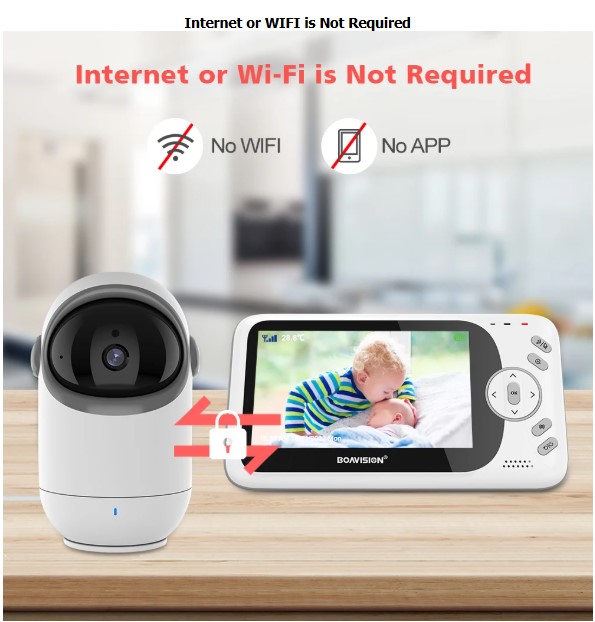
One of the most defining features of the VB801 is what it doesn’t have: Internet connectivity. In an era of “Smart Homes,” this might seem like a step back, but for baby monitors, it is a massive leap forward in security.
The “No WiFi, No App” Philosophy: The Ultimate Review
The BOAVISION VB801 uses 2.4GHz FHSS (Frequency Hopping Spread Spectrum) technology. This creates a private, encrypted connection directly between the camera and the monitor.
- Hacking Protection: WiFi cameras are vulnerable to IP hacking. There have been numerous news reports of strangers accessing internet-connected baby cameras. The VB801 is a closed circuit; to see the video, you must be within the physical radio range of the device.
- Reliability: Your baby monitor does not depend on your internet speed. If your router crashes or your ISP has an outage, the VB801 keeps working.
- Ease of Use: There are no QR codes to scan, no accounts to create, and no passwords to remember. It is a “Plug and Play” experience.
Watch The Video: The Ultimate Review
Deep Dive: The Ultimate Review
The 4.3 Inch LCD Display: The Ultimate Review
The parent unit is your window into your child’s world. The VB801 sports a 4.3-inch color LCD display, which is a “Goldilocks” size in the baby monitor industry—not as bulky as a tablet, but significantly larger than the older 2.4-inch models.
Screen Quality and Resolution
With a resolution of 480 x 272 pixels, the screen offers Standard Definition (SD) clarity. While this isn’t 4K, for a baby monitor, it is optimal. Higher resolutions consume more battery power and require more bandwidth, which can reduce range. The VB801 strikes a balance, providing a clear image where you can see if your baby’s eyes are open or closed without draining the battery in an hour.
Anti-Flicker Technology
The device includes an Anti-flicker setting, allowing users to toggle between 50Hz and 60Hz. This is crucial depending on your region’s electrical frequency (e.g., 60Hz in the US, 50Hz in Europe). Setting this correctly prevents the strobing effect often seen on screens when filming under artificial light, ensuring a smooth video feed.
LCD Backlight Control
Parents often keep the monitor on their nightstand. A glaring bright screen can ruin your sleep. The VB801 allows you to:
- Adjust the brightness levels.
- Set an active time for the backlight (auto-dimming).
This ensures the monitor is viewable when you need it but unobtrusive when you are trying to rest.

Camera Capabilities: The Ultimate Review
Pan, Tilt, and Zoom: The Ultimate Review
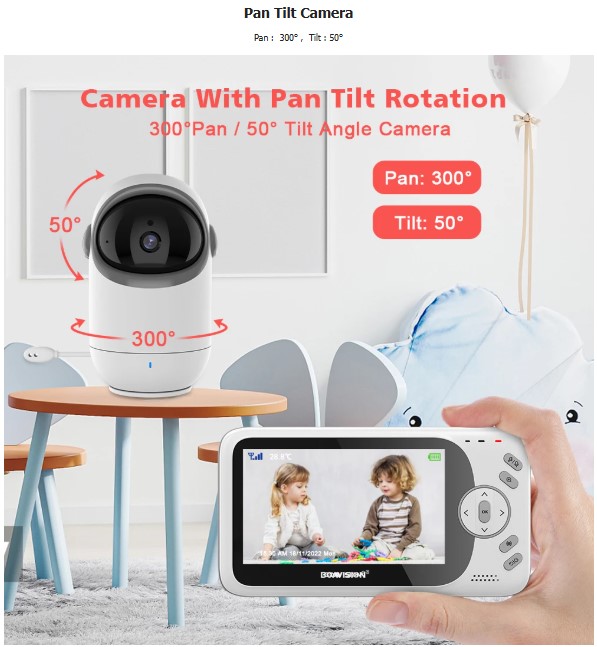
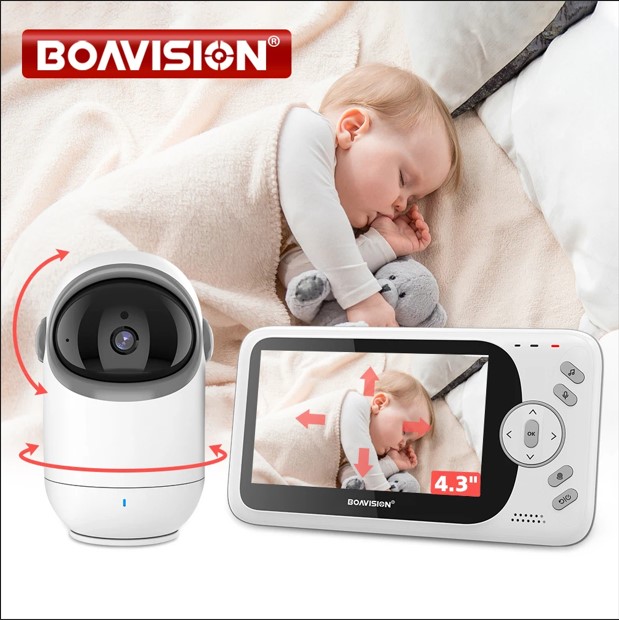
The crowning jewel of the VB801 is its PTZ (Pan-Tilt-Zoom) functionality. Many budget monitors have “static” cameras that must be manually adjusted by hand. The VB801 brings robotic control to your fingertips.
Remote Control
From the parent unit, you can press the specific Pan & Tilt function key. This activates the directional arrows, allowing you to move the camera lens:
- Pan (Horizontal): 300 degrees. This is almost a full circle. If you place the camera in the center of the room, you can see nearly every corner.
- Tilt (Vertical): 50 degrees. This allows you to look down into a crib or up if the baby is standing.
Why Pan-Tilt Matters
- The Toddler Stage: Newborns stay put. Toddlers do not. Once your child starts crawling or playing in their room, a static camera becomes useless. The VB801 allows you to follow them around the room.
- Zoom Function: The user reviews mention a zoom function. This is digital zoom, allowing you to get a closer look at the baby’s chest movement to ensure they are breathing comfortably without entering the room and risking waking them up.
Audio Features: The Ultimate Review
Two-Way Talk & Lullabies: The Ultimate Review
Audio is just as important as video. The VB801 excels in providing clear auditory feedback and interaction options.
Two-Way Audio (Intercom)
The device features a Two-Way Talk Back system.
- Listening: The microphone on the baby unit is sensitive enough to pick up coos, cries, and even rustling sheets.
- Talking: By holding the PTT (Push-to-Talk) key on the monitor, your voice is projected through the camera’s loudspeaker.
Usage Scenario: You are in the kitchen and see your baby stirring. Instead of running upstairs (which might fully wake them), you can press the button and say, “Shhh, Mommy is here, go back to sleep.” often, the sound of a parent’s voice is enough to settle a child.
Built-in Lullabies
The camera comes pre-loaded with 8 polyphonic lullabies.
- Remote Operation: You can turn these on and off from the parent unit. You do not need to enter the room.
- Benefits: White noise and soft melodies drown out household noises (like a TV or doorbell), helping the baby stay asleep.
Night Vision: The Ultimate Review
Seeing in the Dark
Babies sleep in the dark, so a monitor is only as good as its night vision.
Infrared Technology
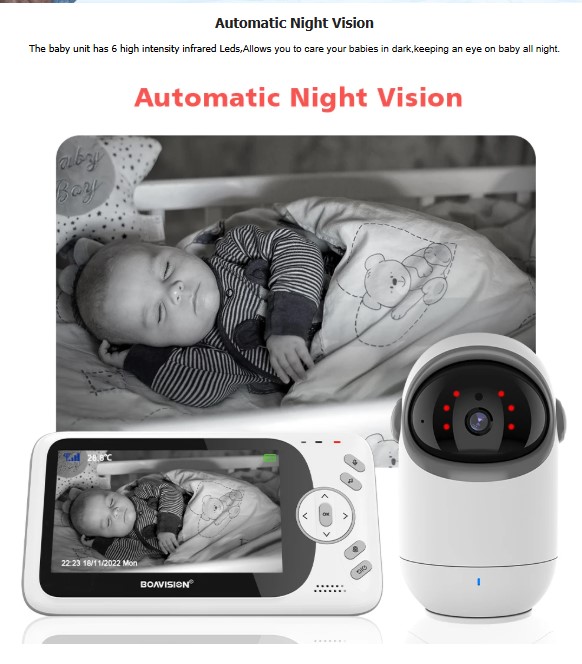
The VB801 baby unit is equipped with 6 High-Intensity Infrared (IR) LEDs.
- Automatic Activation: You don’t need to press a button. A light sensor on the camera detects when the room gets dark and automatically switches to Night Vision mode.
- Image Quality: In night mode, the image switches to greyscale (black and white). The high-intensity LEDs ensure that the image is crisp, not grainy.
- Range: The specs state a visibility range of 15ft (5 meters), which is perfect for a standard nursery size.
Note on “Invisible” LEDs: The use of IR means the light is invisible to the human eye (specifically the baby’s eye). There is no bright spotlight beaming into the crib to disturb their sleep.

Smart Features: VOX Mode & Temperature Monitoring
What is VOX Mode?
VOX stands for Voice Operated Exchange. It is a sound-activated power-saving mode.
- How it works: If the nursery is silent, the monitor screen turns off (sleep mode) to save battery.
- Activation: The moment the camera microphone detects a sound (a cry or a cough), the screen lights up instantly.
- Sensitivity Settings: The VB801 allows you to adjust the sensitivity (Low/Medium/High).
- High: Wakes up for soft whimpers.
- Low: Only wakes up for loud crying (filters out background noise like fans).
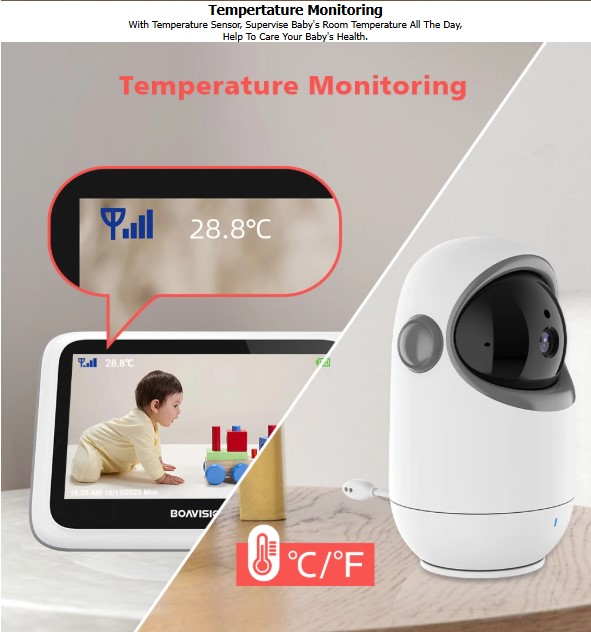
Temperature Monitoring
The camera has a built-in temperature sensor “tail” on the back.
- Real-Time Display: The temperature is displayed constantly on the parent unit screen.
- Unit Switching: You can toggle between Celsius and Fahrenheit.
- Health Benefit: Babies cannot regulate their body temperature well. This feature ensures you know if the room is getting too cold (risk of illness) or too hot (risk of overheating/SIDS).

Battery Life & Power Management: The Ultimate Review
The Parent Unit (Monitor)
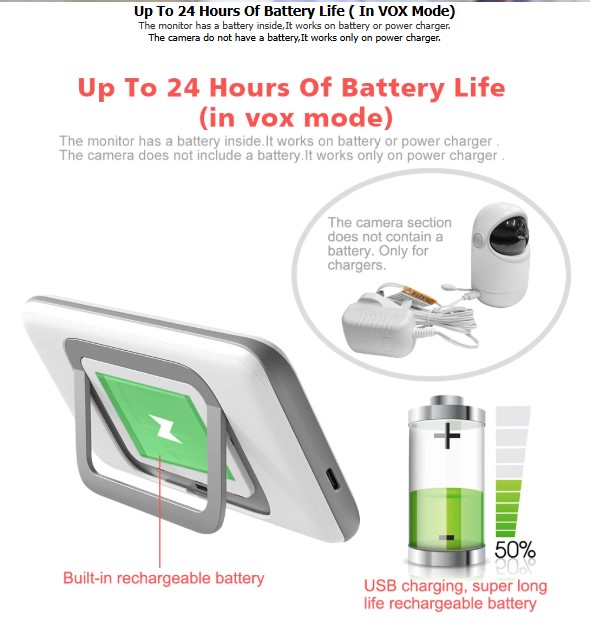
The monitor houses a 1760mAh Li-polymer battery.
- VOX Mode Life: The manufacturer claims up to 24 hours of battery life when used exclusively in VOX mode. This is impressive and allows for overnight monitoring without plugging in (though plugging in overnight is recommended).
- Normal Mode Life: With the screen constantly on, battery life will be shorter (typically 4-6 hours for screens of this size).
- Portability: This battery allows you to clip the monitor to your belt or carry it into the garden while the baby naps.
The Baby Unit (Camera)
- Wired Only: It is crucial to note that the camera does not have a battery. It must be plugged into a wall outlet using the provided power adapter. This is standard for baby monitors to ensure the camera never dies in the middle of the night.
- Power Adapters: The package comes with 2 adapters. The seller offers EU, US, AU, and UK plug types, making it globally compatible.

Range & Connectivity Performance: The Ultimate Review
2.4GHz Wireless Range
- Outdoor (Line of Sight): Up to 260 meters (850 feet).
- Indoor (With Walls): Up to 50 meters (160 feet).
Understanding Interference:
The 2.4GHz frequency is robust and penetrates walls better than 5GHz. However, thick concrete walls or metal appliances (like microwaves) can reduce range. In a standard 2-story home, the VB801 provides reliable coverage from the nursery upstairs to the kitchen or living room downstairs.
Customer Feedback on Range:
Reviewers note that the signal is stable. One user mentioned, “The monitor covers a transmission range… allowing you to care for babies in the dark.” Another user confirmed it works well even when they are “very busy” around the house.

Installation & Setup Guide: The Ultimate Review
One of the VB801’s biggest selling points is its simplicity. Here is a step-by-step guide to getting started.
Unboxing
Package Contents:
- Parent Unit (Monitor)
- Baby Unit (Camera)
- 2 x Power Adapters
- English User Guide
Step 1: Powering the Camera
- Choose a location for the camera. Ideally, place it on a high shelf or mount it on the wall for a bird’s-eye view.
- Plug the power adapter into the camera and the wall outlet.
- The camera will power on (LED indicator will light up).
Step 2: Setting up the Monitor
- Plug the second adapter into the monitor to charge the battery. (It works while charging).
- Press and hold the Power button to turn it on.
Step 3: Pairing
- Good News: The camera and monitor come pre-paired from the factory. You should see the video immediately.
- Re-pairing (if connection is lost): If you ever need to re-pair, go to the Menu -> Camera -> Register. Press the pairing button on the back of the camera unit while the monitor searches.

User Interface & Menu Navigation: The Ultimate Review
The VB801 uses a physical button interface, which is often more reliable than touchscreens for quick adjustments in the dark.
Key Function Buttons
- Music Key: Quick press to play/stop lullabies.
- PTT (Push To Talk): Hold to speak to the baby.
- Volume Key: Adjusts sound level (display shows volume bar for 3 seconds).
- VOX Key: Toggles between Normal mode (screen always on) and VOX mode (screen sleeps).
- Pan/Tilt Key: Enters the mode to move the camera lens.
On-Screen Icons
The status bar at the top of the screen displays:
- Signal Strength (Antenna icon)
- Temperature (Degrees C/F)
- Time/Alarm
- VOX Status
- Battery Level
Customer Reviews Analysis: The Ultimate Review
What 260+ Parents Say
The product boasts a 4.8/5 rating based on 263 reviews. We have analyzed the sentiment to give you the real-world pros and cons.
Positive Feedback (The Pros)
- Image Quality: Users like “A**m”* and “AliExpress Shopper” describe the video as “Relatively good photo quality” and “Video is good.” While they admit it isn’t HD, it is sufficient for the purpose.
- Value for Money: Multiple reviews highlight “Excellent value” and “Worth the price.” Compared to brand-name monitors (like Motorola or Infant Optics) that cost $150+, the VB801 offers similar features for a fraction of the cost.
- Ease of Use: “Easy to install,” “Very easy to operate,” and “Arrived really fast” are common themes.
- Reliability: Users report the device works well over time, with one user noting it is “way better” than their previous Motorola monitor.
Critical Feedback (The Cons)
- Wired Camera: One reviewer noted, “The camera needs to be connected to electricity, so this detail should be taken into account.” This is important for parents hoping for a battery-powered camera for camping; this is strictly for home use where outlets are available.
- Resolution: Users clarify “No HD quality.” If you are looking for crystal clear 1080p Instagram-worthy video, this is not it. It is a security tool, not a movie camera.
Comparison: VB801 vs. The Competition
| Feature | BOAVISION VB801 | Standard WiFi Camera | Traditional Audio Monitor |
| Connectivity | 2.4GHz Wireless (No Internet) | WiFi (Internet Req.) | Radio Frequency |
| Security | High (Closed Loop) | Medium (Hack Risk) | High |
| Video | 4.3″ Color Screen | Phone App | None |
| Pan/Tilt | Remote Controlled | Often Manual Only | N/A |
| Latency | Instant (Real-time) | 2-5 Second Delay | Instant |
| Setup | Plug & Play | App Download/Sync | Plug & Play |
| Price | Budget-Friendly | Variable | Cheap |
Why the VB801 Wins:
For parents who prioritize security and reliability over fancy app features, the VB801 is the superior choice. WiFi cameras often suffer from lag; when you hear the baby cry on a WiFi cam, it might be 5 seconds after the actual event. The VB801 is instant.
Troubleshooting & Maintenance: The Ultimate Review
To ensure your VB801 lasts for years (even for a second child), follow these maintenance tips.
Common Issues and Fixes
1. Screeching Noise (Feedback Loop)
- Symptom: A high-pitched noise when the monitor is near the camera.
- Solution: This is normal audio feedback. Move the parent unit at least 3 meters away from the camera.
2. Poor Range / Signal Drop
- Symptom: Video freezes or says “No Signal.”
- Solution: Extend the antenna on the parent unit. Ensure there are no large metal objects (fridges, filing cabinets) directly between the camera and monitor.
3. Battery Draining Fast
- Symptom: Monitor dies in 3 hours.
- Solution: You are likely in “Normal” mode with high brightness. Switch to VOX Mode to extend battery life up to 24 hours.
4. Night Vision is Cloudy
- Symptom: The image looks foggy at night.
- Solution: Check the camera lens. Dust or fingerprints can reflect the IR light. Wipe the lens with a microfiber cloth. Also, ensure the camera is not facing a window, as the IR light will reflect off the glass.
Chemical Safety
The specifications highlight “High-concerned chemical: None.” This is vital for baby products. Babies are sensitive to environmental toxins. Knowing the plastics and components are free from harmful restricted chemicals provides extra peace of mind.

Pros & Cons At A Glance: The Ultimate Review
To help you make a quick decision, here is a summary of the strongest selling points and the limitations of the BOAVISION VB801 system.
✅ The Pros (What We Love)
- 100% Privacy & Security: Because it operates on a closed 2.4GHz frequency without WiFi or Apps, it is virtually impossible for hackers to access your video feed.
- Remote Pan & Tilt: The ability to rotate the camera 300° horizontally and 50° vertically from the parent unit is a premium feature rarely found at this price point.
- Excellent Battery Life: With the dedicated VOX (Smart) mode, the parent unit can last up to 24 hours on a single charge, easily lasting through the night.
- Decent Screen Size: The 4.3-inch LCD display is significantly larger than standard 2.4-inch budget monitors, making it easier to see breathing movements.
- Plug & Play: No complicated router setups, QR codes, or account registrations. It works instantly out of the box.
- Temperature Monitoring: Built-in sensors help you maintain a safe and comfortable environment for the baby.
❌ The Cons (What to Consider)
- Camera is Not Portable: While the parent monitor has a battery, the camera unit (Baby Unit) must be plugged into a wall outlet at all times to function. It does not have an internal battery.
- No Smartphone Access: Since there is no WiFi, you cannot view the feed on your phone while you are at work or out of the house.
- Standard Definition Video: The resolution is 480p/720p, which is clear enough for monitoring but lacks the crystal-clear sharpness of modern 1080p HD smartphone cameras.
- Single Channel Only: The specifications indicate 1 channel, meaning you likely cannot pair multiple cameras to a single monitor if you have twins or want to monitor multiple rooms.
Final Verdict: The Ultimate Review
Is the VB801 Worth It?
After analyzing the specifications, the software features, and the user feedback, the conclusion is clear.
The BOAVISION VB801 is an exceptional mid-range baby monitor that punches above its weight class. It offers premium features like Remote Pan/Tilt, Two-Way Audio, and Temperature Monitoring at a budget-friendly price point.
It is highly recommended for:
- Parents concerned about privacy and hacking (No WiFi).
- Homes with toddlers (Pan/Tilt tracks movement).
- Parents who want a simple, dedicated device without draining their smartphone battery.
- Grandparents or babysitters (Simple interface, no app required).
It is NOT for:
- Parents who want to check on the baby from work (requires internet).
- Those demanding 4K video quality.
For the vast majority of families, the VB801 offers the perfect balance of technology, safety, and simplicity.
Frequently Asked Questions (FAQ): The Ultimate Review
Q1: Can I add more cameras to this system?
A: The current specifications list “Number of Channels: 1.” Unlike some models that support split-screen for 4 cameras, the VB801 appears designed as a dedicated single-camera unit.
Q2: Does the camera need WiFi to work?
A: No! It uses 2.4GHz wireless technology. It works independently of your home internet.
Q3: Can I mount the camera on the wall?
A: Yes. The base of the camera is designed to sit on a shelf, but it also has mounting points. You can easily attach it to a wall or ceiling (image can be flipped in settings if mounted upside down).
Q4: How long does the battery last?
A: The monitor lasts up to 24 hours in VOX mode. If the screen is on continuously, expect 4-6 hours. The camera must always be plugged in.
Q5: Is the night vision light disturbing to the baby?
A: No. It uses Infrared LEDs which emit a faint red glow (or are invisible) that does not illuminate the room like a lamp. It allows you to see the baby, but the baby remains in the dark.
Q6: What languages does the menu support?
A: It is truly international, supporting English, French, Spanish, Portuguese, Italian, German, Turkish, and Russian.
Q7: Can I talk to my baby through the camera?
A: Yes, the Two-Way Talk function allows you to soothe your baby remotely by holding the PTT button on the monitor.
Q8: Does it have a feeding timer?
A: Yes, the specifications list “Feeding Time Reminder” as a feature. You can set alarms to remind you when it is time for the next feed or diaper change.
Disclaimer: This article is for informational purposes. While we strive for accuracy based on the provided specifications and reviews, always refer to the official user manual included with your purchase for the most up-to-date safety instructions and operational guides.

3 thoughts on “The Ultimate Review: BOAVISION VB801 4.3 Inch Video Baby Monitor with Pan-Tilt Camera”
Great design and fast delivery. Very happy!
Nice
Great